Enhance Your Image Quality with This Free and Open Source AI Image Upscaler
- Azriel Akbar Sofyan
- Digital Image, Application
- 09 Sep, 2026
Sometimes, a blurry shot can ruin the quality of a photo and take away from a special moment. Other times, we might download images from the internet for research or graphic design projects, only to find that high-resolution versions aren't available anywhere. Naturally, we want to enhance these images, but paid subscriptions can be a dealbreaker. Many of the best image enhancers require monthly plans or limit usage with a point system. Fortunately, artificial intelligence has come to the rescue, helping people streamline their workflow without breaking the bank. The power of open-source projects also helps us use great quality tools for free, saving money without sacrificing productivity. One of the best free and open-source tools for enhancing images is Upscayl.
What is Upscayl
Upscayl is an AI image upscaler that turns fuzzy photos into clear works of art! Easy to use and fun to say, it’s the magic wand your images have been waiting for. What makes Upscayl different from other tools is that it is open source, completely free, and powered by Artificial Intelligence. It lets you enhance and save your images without worrying about data privacy or expensive subscriptions. Because it is powered by AI, you can maximize the potential quality of your photos. You no longer need to worry about blurry or low-resolution images. Furthermore, Upscayl provides various models you can choose from based on your needs, adding great flexibility for different types of images.
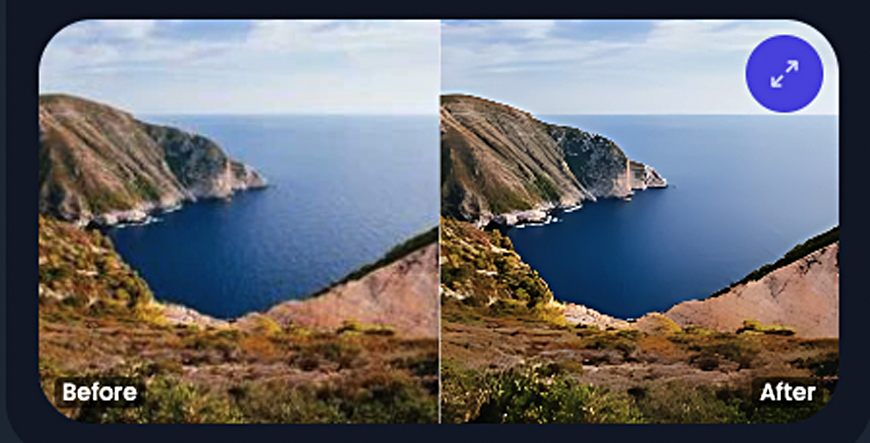
Upscayl let you enhance any images. You just need to follow simple process to get your image enhanced. Only select your image that you want to enhance and select the AI model for enhancing your image. Enhanced image will be ready just for a few seconds depend on your enhance quality and computer spesifications. Here is the example result of enhanced image by using Upscayl.
Upscayl is cross-platform too, which means it can be used on many platform. Currently you can used Upscayl on Windows, Mac OS, and Linux operating system. Just download the application for your operating system and enjoy enhancing your images for free without any limitations.
Upscayle Features
Here are Upscayl features to support your creative work.
Free and Open Source
Upscayl is free and open source, means that you can see all its original source code. You also can build new features or customize on top of original application by your own. Because of open source, you can use the application for free without any subscriptions and worrying about data privacy. Your data will be saved and not be shared by others. This will make you more convenience to enhance your images.
Save Image in High Quality
Upscayl let you save your low quality image to the higher one up to 16x. This is best for you to enhance some low quality images that you have without missing its detail with the help of AI models.
Batch Upscayl
If you have a number of images to being enhanced at once, you can use Upscayl batch feature. So you don’t need to enhance your image one by one. This will save your time and your work.
Model for Every Need
Upscayl provides some models that you can choose based on your need. You can try these models to get best result of your images. But some of models can be run properly depend on your computer spesifications. The better model also need some times to wait for the result depend on computer spesification and image size. If you don’t have powerfull computer, you still can use Upscayl with the default model or you can try Upscayl Cloud.
Download Upscayle
You can try and download Upscayl from its official website here: